> ## Documentation Index
> Fetch the complete documentation index at: https://docs.httpmon.dev/llms.txt
> Use this file to discover all available pages before exploring further.
# Flow details
> Inspect request and response headers, bodies, and metadata
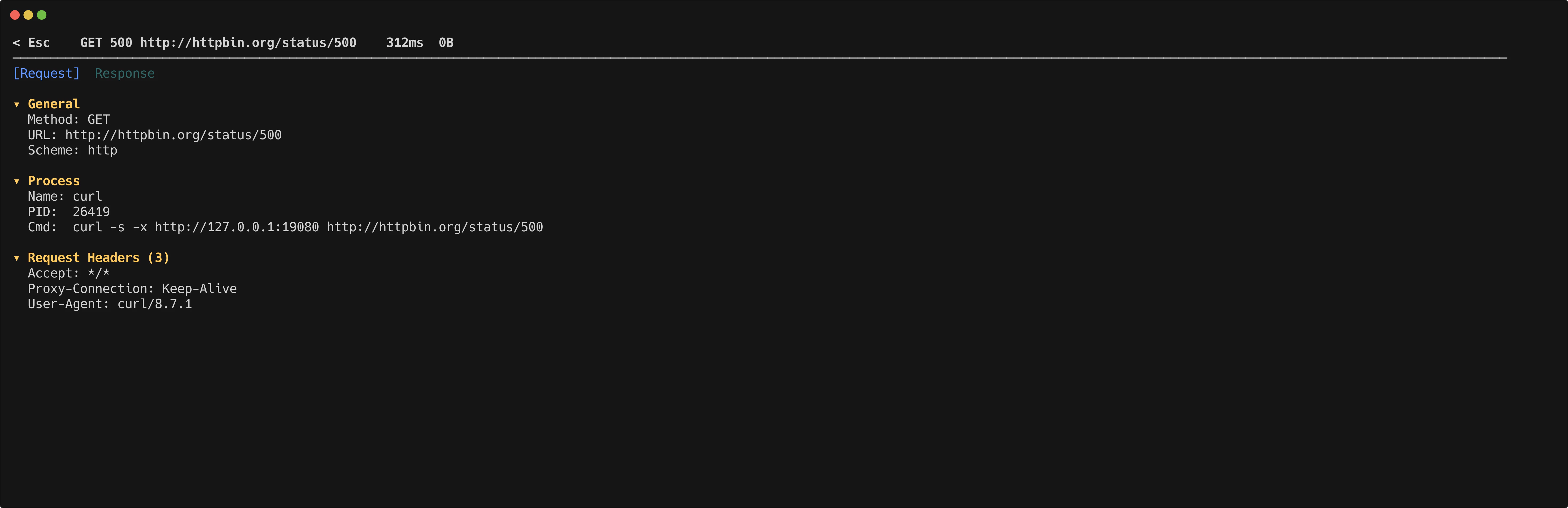
The detail view lets you inspect every part of a captured request and its response.
 ## Tabs
Switch between the request and response with number keys.
| Key | Tab |
| --- | -------- |
| `1` | Request |
| `2` | Response |
## Collapsible sections
Each tab contains three collapsible sections. Toggle them with a single keypress.
| Key | Section |
| --- | ------------------------------------- |
| `g` | General (method, URL, status, timing) |
| `h` | Headers |
| `b` | Body |
## Body rendering
httpmon applies syntax highlighting to JSON, HTML, and XML bodies automatically.
| Key | Action |
| --- | --------------------------------------------- |
| `p` | Toggle between pretty-printed and raw body |
| `i` | Toggle image preview for image responses |
| `e` | Open body in external editor (uses `$EDITOR`) |
## Search
Press `/` to search within the current content. Navigate between matches using the standard search keys.
## Navigation
| Key | Action |
| --------- | -------------------------- |
| `n` / `N` | Next / previous flow |
| `d` / `u` | Half-page scroll down / up |
| `j` / `k` | Scroll content |
| `Esc` | Back to flow list |
## Tabs
Switch between the request and response with number keys.
| Key | Tab |
| --- | -------- |
| `1` | Request |
| `2` | Response |
## Collapsible sections
Each tab contains three collapsible sections. Toggle them with a single keypress.
| Key | Section |
| --- | ------------------------------------- |
| `g` | General (method, URL, status, timing) |
| `h` | Headers |
| `b` | Body |
## Body rendering
httpmon applies syntax highlighting to JSON, HTML, and XML bodies automatically.
| Key | Action |
| --- | --------------------------------------------- |
| `p` | Toggle between pretty-printed and raw body |
| `i` | Toggle image preview for image responses |
| `e` | Open body in external editor (uses `$EDITOR`) |
## Search
Press `/` to search within the current content. Navigate between matches using the standard search keys.
## Navigation
| Key | Action |
| --------- | -------------------------- |
| `n` / `N` | Next / previous flow |
| `d` / `u` | Half-page scroll down / up |
| `j` / `k` | Scroll content |
| `Esc` | Back to flow list |