> ## Documentation Index
> Fetch the complete documentation index at: https://docs.httpmon.dev/llms.txt
> Use this file to discover all available pages before exploring further.
# Breakpoints
> Pause and edit requests or responses before they continue
Breakpoints let you pause a request or response mid-flight, inspect it, and optionally modify it before it continues. You trigger breakpoints from scripts using `ctx.breakpoint()`.
## Set a breakpoint in a script
Call `ctx.breakpoint()` inside an `onRequest` or `onResponse` hook. When the matching request fires, httpmon pauses the flow and waits for you to resume it.
```javascript theme={"theme":{"light":"github-light","dark":"github-dark"}}
// ---
// name: Inspect POST Requests
// match:
// - "*://httpbin.org/post"
// enabled: true
// ---
function onRequest(ctx) {
ctx.breakpoint();
}
```
This script pauses every POST request to `httpbin.org/post` before it reaches the server.
## Breakpoint queue
Press **B** to open the breakpoints queue. This shows all flows currently paused at a breakpoint, waiting for you to inspect and resume them.
When a flow hits a breakpoint, it shows a breakpoint state indicator in the flow list. The status bar also shows the number of pending breakpoints.
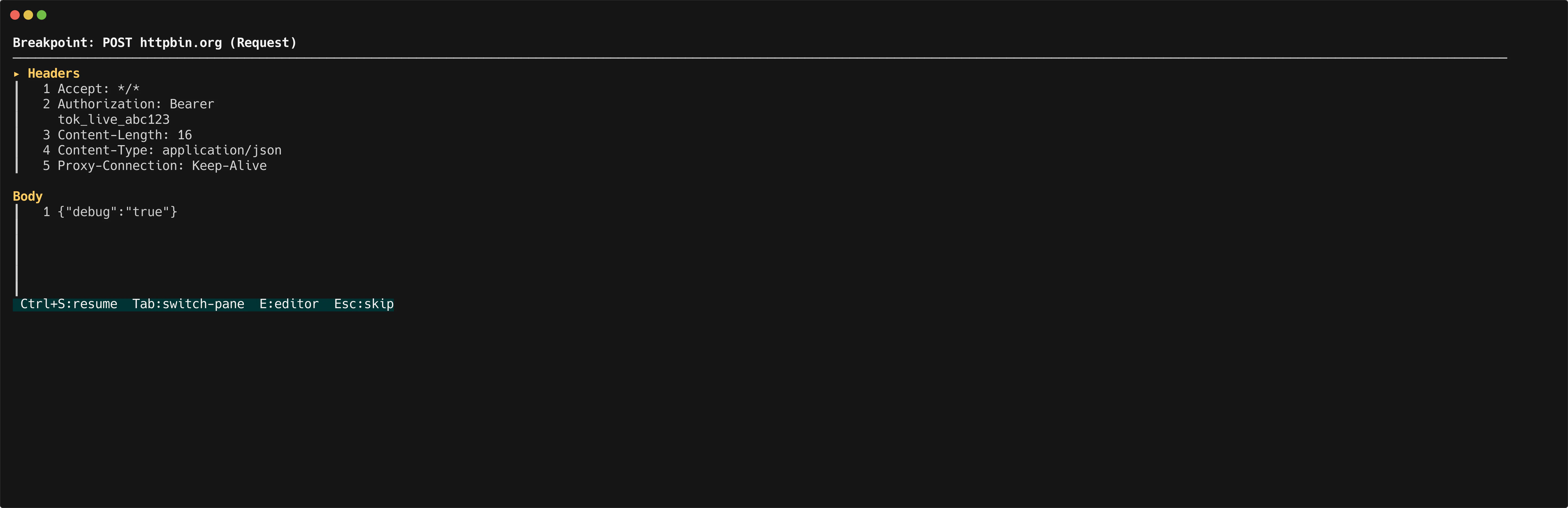
## The breakpoint editor
Select a paused flow from the breakpoint queue (or press `Enter` on a paused flow in the list) to open the breakpoint editor.
The editor uses a dual-pane layout:
* **Left pane** — Headers. View and edit request or response headers.
* **Right pane** — Body. View and edit the request or response body with syntax highlighting.
Use `Tab` to switch between panes. Modify any header or body content, then press **Resume** to send the modified request upstream (or the modified response back to the client).
 ## When to use breakpoints
* Inspect the exact payload your app sends before it leaves
* Inject or modify headers (auth tokens, content types) on the fly
* Alter request bodies to test edge cases without changing application code
* Inspect and rewrite responses before your app processes them
## When to use breakpoints
* Inspect the exact payload your app sends before it leaves
* Inject or modify headers (auth tokens, content types) on the fly
* Alter request bodies to test edge cases without changing application code
* Inspect and rewrite responses before your app processes them